
Gated PDFs can bring in form fills, but they tell...
Read More


How Community-Led Growth Helps B2B Companies Increase Customer Retention
You’ve got a Slack workspace with 847 members. Your Discord...
Read More

International SEO Strategy: Common Mistakes SaaS Companies Should Avoid
A market research study projects that the global SEO market...
Read More
How to Create Sales Enablement Content for Every Stage of the B2B Buyer’s Journey
According to Gartner’s 2026 sales survey, 67% of B2B buyers...
Read More
How B2B Podcast Marketing Builds Authority and Drives Pipeline
Podcasting has become an increasingly important channel for brands looking...
Read More
How B2B Video Marketing Improves Brand Trust and Sales Conversions
Think about the last time you considered buying a B2B...
Read More
You Don’t Know You are Scaling Until the Questions Change
A founder asks, ‘Can we do it?’ A scaling company...
Read More
Schema Markup for SEO: Essential Structured Data Every B2B Website Needs
According to the July 2026 Schema.org usage dataset, 5,545 Schema.org...
Read More
How a Sportsman’s Mindset Shapes Business Growth
What can building a business learn from building an athlete?...
Read More
How to Build a LinkedIn Marketing Strategy That Generates High-Quality B2B Leads
A strong LinkedIn marketing strategy is necessary if you want...
Read More
Gated PDFs can bring in form fills, but they tell you very little about the person downloading them. Sales gets an email address and a job title, then has to figure out whether the person is a serious prospect or just looking for information.
A calculator or quiz gives you a different kind of insight. Visitors answer questions about their company or their specific problem and get a result they can use. If you ask the right questions, you can learn about their business, what they are struggling with, and what they may need help with before the first sales call.
Give buyers an answer they can take to their finance team
Say a company is planning a cloud migration. The person researching it wants a number. A long article on cloud costs won’t give them one. A calculator will. They type in their headcount and what they spend now, and they get a rough figure they can show their finance team.
That last part matters. In B2B, the person who finds you almost never signs the contract. They have to sell the idea to someone else, and a figure built from their own inputs is much easier to defend than a link to your blog.
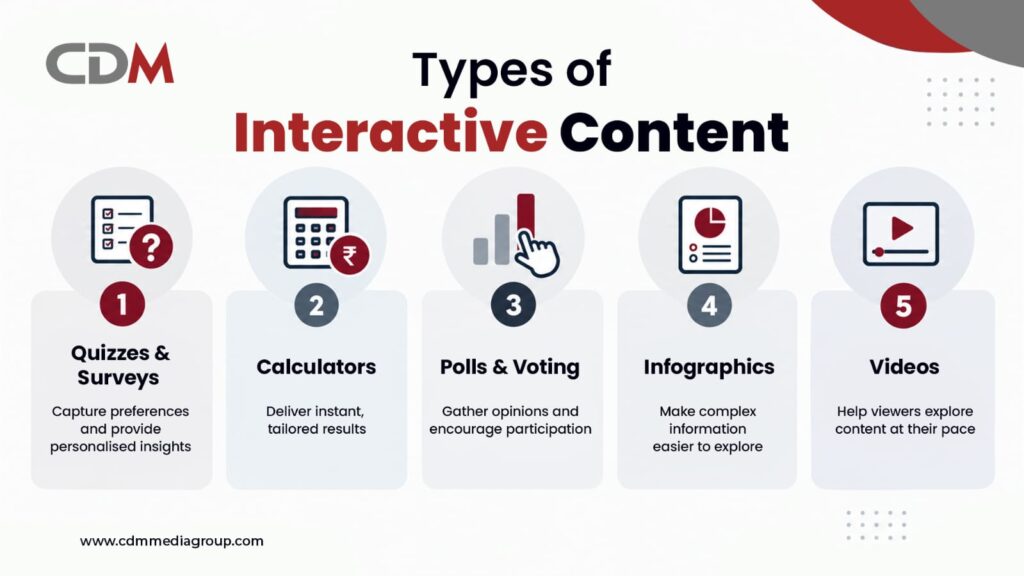
Calculators, quizzes or assessments: which one fits your buyer?
Start with the buyer’s stage. Don’t copy a competitor because they happen to have a quiz.
If the buyer is close to a decision, build a calculator. They enter their team size and what they spend today, and what comes out is pretty much a business case. If you only have a budget for one tool, make it this one.
Quizzes and polls suit people who are earlier on. They know something’s off but can’t say what. Keep it to around eight questions, and make sure the result is useful even if the person never talks to you.
Assessments sit in the middle. A security readiness check, for example, shows a buyer where they’re weak, which is exactly what they were trying to figure out. It also takes some of the load off your first discovery call.
Interactive infographics and branching videos are fine for long research reports. They rarely bring in leads on their own, so give them a clear next step.
Turn buyer responses into a more useful sales conversation
The best part of a tool like this is what you learn from the answers. When someone finishes an assessment, you know how big their company is and where things are going wrong for them. Normally a sales rep would have to find that out over a couple of calls.
It makes the first sales call easier too. A rep who can see the prospect scored badly on integration will bring that up straight away, rather than reading out the usual introduction. The same data tells you who to call and who to leave alone for now. A person with a budget and a deadline gets a phone call this week. Someone planning for next year goes on the email nurture list.
Put the form after the first part of the result, not before it. We’d show a partial result and ask for contact details to unlock the full version. People who haven’t seen any value yet tend to close the tab the moment they hit a form.
Why interactive content fails to generate leads
There are really only two things that kill these tools. One is a result that looks the same for everybody, which makes people wonder why they bothered. The other is length. A quiz that goes on too long loses people halfway through.
What happens next matters just as much. Many result pages just end, with no button or offer, and the lead goes into a shared inbox that nobody checks. Think about promotion before you build, too. A calculator sitting on a page nobody visits might as well not exist.
Measure lead quality, not just tool completions
Don’t judge the tool by time on page or shares. They look good in a report but say very little about revenue. Begin with two numbers: how many people started and how many finished. A big drop at one particular question tells you that question is the problem. After that, look at how many finishers filled in the form.
Next comes the CRM. You’re looking for how many of those leads became sales-qualified and how much pipeline came out of them. Take the full cost of building and promoting the tool, divide it by the qualified leads, and you have a cost per lead to hold up against your other channels. And talk to your sales team. They will know straight away whether the information is of any use.
Planning an interactive content strategy for B2B
Look at the questions your sales team gets asked most often. Pick one and build a tool that helps buyers find an answer. Plan the questions and results before you start building. A no-code platform should work for a basic quiz or calculator, while more complex tools may need a developer. Set up tracking before launch so you can see where people drop off and what needs fixing.
Interactive content as part of your B2B lead generation strategy
Start with one tool and see if it brings in useful leads. After a few months, review the results with your sales team and decide if it is worth improving or trying another format.
Need help creating interactive content? CDM Media Group can help you plan and develop it. Contact us today.

FAQs
1 . How does interactive content help with B2B lead generation?
A. Buyers get a result that’s based on their own numbers. In return you get the answers they entered, which tells you how serious they are and what to say when you follow up.
2 . Why is it more engaging than static content?
A. Because the reader is actually doing something. People spend longer on a tool built around their own inputs, and they’re more likely to pass it to the others involved in the decision.
3 . Which format should we build first?
A. A calculator, if you can. Base it on a question buyers ask late in the process, since the people using it are usually close to buying.
4 . How do we measure ROI?
A. Add up what it costs to build and promote, then compare that with the qualified leads and revenue your CRM links to it. Completion rate and form conversion will tell you early on if it’s working.
5 . Does it improve lead quality?
A. Generally yes. You see the prospect’s budget and problems in their own answers, so you aren’t guessing.